2024.08.09 台北大巨蛋








參考 Learn How to Code a Simple JavaScript Calendar and Datepicker 這篇教學,做了一個簡單的月曆。
const previousMonth = document.querySelector('.previous-month');
const nextMonth = document.querySelector('.next-month');
const yearMonth = document.querySelector('.year-month');
const day = document.querySelector('.day');

let today = new Date();

// returns the full year of a date
// 4 digits
let year = today.getFullYear();

// returns the month (0 to 11) of a date
let month = today.getMonth();

showCalendar();

// 上個月
previousMonth.addEventListener('click', (e) => {
  e.preventDefault();

  month--;

  if (month < 0) {
    year--;
    month = 11;
  }

  showCalendar();
});

// 下個月
nextMonth.addEventListener('click', (e) => {
  e.preventDefault();

  month++;

  if (month > 11) {
    year++;
    month = 0;
  }

  showCalendar();
});

// function
function showCalendar() {
  yearMonth.innerHTML = `${year} / ${month + 1}`;

  // 當月第一天
  const firstDay = new Date(year, month, 1);

  // returns the day of the week (0 to 6) of a date
  // Sunday = 0, Monday = 1, ....
  const firstDayIndex = firstDay.getDay();

  // 當月最後一天
  const lastDay = new Date(year, month + 1, 0);

  // returns the day of the month (1 to 31) of a date
  const daysInMonth = lastDay.getDate();

  let dayHtml = '';

  for (let i = 1; i <= 42; i++) {
    if (i < firstDayIndex + 1) {
      dayHtml += '<div></div>';
    } else if (i > firstDayIndex + daysInMonth) {
      break;
    } else {
      const dayNumber = i - firstDayIndex;

      if (
        year === new Date().getFullYear() &&
        month === new Date().getMonth() &&
        dayNumber === new Date().getDate()
      ) {
        dayHtml += `<div class="current-date">${dayNumber}</div>`;
      } else {
        dayHtml += `<div>${dayNumber}</div>`;
      }
    }
  }

  day.innerHTML = dayHtml;
}說明:把指定資料夾內的檔案、資料夾使用 7-Zip 壓縮成一個 .zip 檔,再把 .zip 檔上傳到 FTP Server,上傳成功後會使用 Outlook 2013 建立新 Email。
有用到 ftp package。
const fs = require('fs');
const path = require('path');
const { execSync } = require('child_process');

const ftpClient = require('ftp');

if (process.argv.length > 3) {
  console.log('檔名請勿包含空格!');
  return;
}

// 取得 .zip 檔名,預設為:YYYYMMDD-HHMMSS
const zipFileName = process.argv[2] || getDateTime();

// app
const z7 = '"C:\\Program Files\\7-Zip\\7z.exe"';
const outlook2013 = '"C:\\Program Files (x86)\\Microsoft Office\\Office15\\OUTLOOK.EXE"';

// 程式執行資料夾
const currentFolder = path.join(__dirname);

// 要被壓縮檔案、資料夾的路徑
const ftpFolder = path.join(currentFolder, 'FTP');

const fileList = fs.readdirSync(ftpFolder);

if (!fileList.length) {
  console.log('FTP 資料夾內沒有檔案');
  return;
}

// zip 檔輸出資料夾
const zipOutputFolder = path.join(currentFolder, 'OUTPUT');

// 如果 OUTPUT 資料夾存在,刪除
if (fs.existsSync(zipOutputFolder)) {
  try {
    fs.rmSync(zipOutputFolder, { recursive: true, force: true });
  } catch (err) {
    console.log(`錯誤:${err.message}`);
  }
}

// 建立 OUTPUT 資料夾
try {
  fs.mkdirSync(zipOutputFolder);
} catch (err) {
  console.log(`錯誤:${err.message}`);
}

const zipFile = path.join(zipOutputFolder, `${zipFileName}.zip`);

// 壓縮檔案
compressFiles();

// --- function ---
function formatBytes(bytes) {
  if (bytes === 0) {
    return '0 Bytes';
  }

  const k = 1024;
  const sizes = ['Bytes', 'KB', 'MB', 'GB', 'TB'];

  const i = Math.floor(Math.log(bytes) / Math.log(k));

  return parseFloat((bytes / Math.pow(k, i)).toFixed(2)) + sizes[i];
}

function getDateTime() {
  let today = new Date();

  let year = today.getFullYear();
  let month = ('0' + (today.getMonth() + 1)).slice(-2);
  let date = ('0' + today.getDate()).slice(-2);

  let hours = ('0' + today.getHours()).slice(-2);
  let minutes = ('0' + today.getMinutes()).slice(-2);
  let seconds = ('0' + today.getSeconds()).slice(-2);

  return `${year}${month}${date}-${hours}${minutes}${seconds}`;
}

function compressFiles() {
  fileList.forEach((f) => {
    const file = path.join(ftpFolder, f);
    const stats = fs.statSync(file);
    const type = stats.isDirectory() ? '資料夾' : '檔案';

    console.log(`${type} [${f}] 加入壓縮檔`);

    execSync(`${z7} a ${zipFile} "${file}"`, (error, stdout, stderr) => {
      if (error) {
        console.log(`[Error]: ${error.message}`);
        return;
      }

      if (stderr) {
        console.log(`[stderr]: ${stderr}`);
        return;
      }
    });
  });

  console.log('檔案壓縮 .... OK');

  // 上傳 FTP
  uploadFileToFtp();
}

function uploadFileToFtp() {
  const client = new ftpClient();

  client.on('ready', () => {
    client.put(
      zipFile,
      `/downloads/${zipFileName}.zip`,
      (err) => {
        if (err) {
          throw err;
        }

        console.log('檔案上傳 .... OK');

        client.end();

        // 建立新 email
        launchOutlook();
      }
    );
  });

  client.on('error', (err) => {
    console.log('FTP 連接錯誤:', err);
  });

  // 連接到 FTP 伺服器
  client.connect({
    host: '1.1.1.1',
    user: 'user',
    password: 'pwd',
  });
}

function launchOutlook() {
  const fileName = `${zipFileName}.zip`;
  const stats = fs.statSync(zipFile);
  const fileSize = formatBytes(stats.size);
  const downloadUrl = `https://www.abc.com.tw/downloads/${fileName}`;
  const htmlBody = `File Size: ${fileSize}\n\nDownload URL: ${downloadUrl}`;
  const mailtoLink = `mailto:?subject=${encodeURIComponent(fileName)}&body=${encodeURIComponent(
    htmlBody
  )}`;

  execSync(`start ${outlook2013} "${mailtoLink}"`, (error, stdout, stderr) => {
    if (error) {
      console.log(`[Error]: ${error.message}`);
      return;
    }

    if (stderr) {
      console.log(`[stderr]: ${stderr}`);
      return;
    }
  });
}網站沒有做前後端分離,但想要用 Vue,而且還要用 Composition API,可以使用下面的方式:
// 引用的時候記得要加上 type="module"
// <script src="demo.js" type="module"></script>
// 開發的時候可以把 vue.esm-browser.prod.js 的 .prod 去掉,方便用 Vue.js devtools 除錯

import {
  createApp,
  ref,
  computed,
  watch,
  nextTick,
  onMounted,
} from 'https://unpkg.com/vue@3/dist/vue.esm-browser.prod.js';

// 引入 component
import SelectComponent from './select-component.js';

const vueApp = createApp({
  components: {
    SelectComponent,
  },

  setup() {
    ...

    return { ... }
  }
});

vueApp.mount('#app');
// select-component.js
import { ref } from 'https://unpkg.com/vue@3/dist/vue.esm-browser.prod.js';
export default {
name: 'SelectComponent',
props: ['modelValue', 'getPageNumber', 'itemsPerPage'],
emits: ['update:modelValue'],
template: `
<select
class="form-select"
v-model="page"
@change="$emit('update:modelValue', $event.target.value)"
>
<option
:value="n"
v-for="n in getPageNumber"
>
Episode {{ (n * itemsPerPage) - itemsPerPage + 1 }} ~ Episode {{ n * itemsPerPage }}
</option>
</select>
`,
setup(props) {
const page = ref(props.modelValue);
return { page };
},
};// 在 html 使用 component
// tag 使用 <select-component></select-component>
<select-component
v-model="page"
:get-page-number="getPageNumber"
:items-per-page="ITEMS_PER_PAGE"
></select-component>發送 EDM 的時候會夾帶 ID,可以藉此知道是哪一位會員有開過 EDM。
從 Web Server 的 Log 撈出不重複的資料後,使用 phpMyAdmin 匯入到 MySQL。
再跟會員資料表做 JOIN,可以得到有開過 EDM 的會員部份資訊。
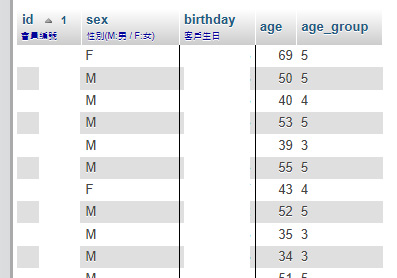
SQL 語法如下:
// customer 是會員資料表
// mytest 是不重複的 ID 資料表

SELECT
  id,
  sex,
  birthday,
  2024 - SUBSTR(birthday, 1, 4) AS age,
  CASE
    WHEN 2024 - SUBSTR(birthday, 1, 4) < 20
      THEN '1'
    WHEN 2024 - SUBSTR(birthday, 1, 4) >= 20
      AND 2024 - SUBSTR(birthday, 1, 4) < 30
      THEN '2'
    WHEN 2024 - SUBSTR(birthday, 1, 4) >= 30
      AND 2024 - SUBSTR(birthday, 1, 4) < 40
      THEN '3'
    WHEN 2024 - SUBSTR(birthday, 1, 4) >= 40
      AND 2024 - SUBSTR(birthday, 1, 4) < 50
      THEN '4'
    WHEN 2024 - SUBSTR(birthday, 1, 4) >= 50
      THEN '5'
    ELSE 'unknow'
  END AS 'age_group'
FROM customer
RIGHT JOIN mytest
  ON customer.id = mytest.customer_id
WHERE birthday IS NOT NULL
ORDER BY id ASC;